

The 2.7.0.5 release of 1QQQ refines an already simple design rather than adding complexity. It is simple on the surface, considered underneath.
First Look at 1QQQ
1QQQ grew through word of mouth rather than big marketing, which shows in its no-friction onboarding. It is a small detail that matters over weeks of use.
How 1QQQ installs on Android
If a screen freezes, close 1QQQ from the recent-apps view and reopen.

Getting Started with an Account
Never share verification codes with anyone, including people claiming to be support. This keeps day-to-day use predictable.
Payment Considerations
Promotions never guarantee withdrawal; eligibility and conditions come first. It leaves room for the rest of your phone to do its job.
Against the Competition
If 1QQQ is not the right fit, the related-apps section lists similar options. For a phone-first app, that is the right priority.
Curiosity about rankings is common, and the Sportuna register draws steady traffic. Most of the polish is invisible until you need it.
Trending Android Apps This Week
When 1QQQ updates land, traffic shifts toward neighbor apps for a few days. Returning users notice the same behavior every time.
What Is New in 2.7.0.5
Installing the new APK over the old build is enough; no uninstall step is needed. The behavior stays consistent across versions.
After install, open 1QQQ once online so the 2.7.0.5 build can validate its files. The result is a calmer, more predictable session.
What Sets 1QQQ Apart
A compact quick-actions bar keeps the top destinations visible at all times. Power users will appreciate that it stays out of the way.
The app runs on a wide range of Android versions, so older devices do not need to be retired just to keep using it.
The install size leaves room for other apps even on tighter storage. Reviews tend to mention this point first.
How 1QQQ Works
1QQQ grew through word of mouth rather than heavy marketing, which shows in its no-friction onboarding. It is a deliberate trade that favors reliability.
At its core, 1QQQ is a mobile-first platform built around short, repeatable sessions. You feel the difference most on a busy phone.
What We Like and Dislike
- Strong load consistency
- Clear transaction records
- Region-aware defaults
- No aggressive popups
Feature depth is intentionally limited, which keeps things fast.
Compared with other Android apps, 1QQQ trades feature depth for speed. Players who want quick access with minimal setup tend to prefer it, while those seeking long-form content may look elsewhere.
Staying Safe with 1QQQ
Never share your password or verification codes; support never asks for credentials over chat. Nothing here asks more of your device than necessary.
Getting More from 1QQQ
Review permission grants once a month from Android settings. It is a small detail that matters over weeks of use.
Bookmark the official page for quick access to clean downloads. You feel the difference most on a busy phone.
How to Download and Install 1QQQ APK
Enable installs from your browser once if Android asks; 1QQQ never re-asks after that. This keeps day-to-day use predictable.
1. Confirm the device runs a supported Android version.
2. Download 1QQQ v2.7.0.5.
3. Install and open once online.
4. Set your preferences in the account area.
No restart is required after installation.
Regional Availability
Regional availability shapes parts of the 1QQQ experience - promotions, transaction methods, and language support all vary. The 2.7.0.5 build detects basic settings automatically during first launch.
Never treat a displayed balance as guaranteed withdrawable funds before reading the terms. Most of the polish is invisible until you need it.
Local Notes
If your region shows fewer sections, the rest usually appear once payment methods for it are enabled. That decision keeps the app approachable for newcomers.
Setup from Start to Finish
1. Open the official 1QQQ page on the phone you will use.
2. Wait for the file to finish downloading before opening it.
3. Close other apps if the installer reports low memory.
4. Launch 1QQQ and allow only the permissions you recognize.
Where 1QQQ Fits
Against similar apps in the Android space, the 2.7.0.5 build stands out for its short load times and small footprint rather than raw feature count.
Community chatter often names a rising app alongside 1QQQ during update weeks.
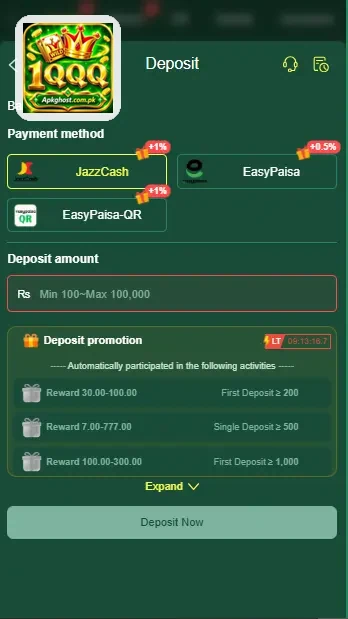
Payments and Transactions
Bonus credits often carry wagering or usage restrictions; the card spells them out. Reviews tend to mention this point first.
Withdrawal processing is not instant on most methods; plan accordingly. The choice fits how most people actually use a phone.
Tips for New Users
If a screen ever freezes, close the app from the recent-apps view and reopen it. Persistent issues are usually fixed by clearing the app cache from Android settings.
Start with the built-in tutorial if it appears on first launch; it explains the lobby fastest. Nothing here asks more of your device than necessary.
Weighing 1QQQ
- Updates never reset display preferences
- Frequent small updates that keep the app current
- Fast, lightweight lobby that opens in seconds
- Feature depth is intentionally limited
- Some sections depend on regional availability
Heavier platforms offer more sub-features, but 1QQQ answers with consistency and fewer surprises. Returning users notice the same behavior every time.
Keeping Your Account Secure
Set a session budget before playing and stick to it.
Use the search field inside the lobby instead of scrolling long lists. For a phone-first app, that is the right priority.
What 1QQQ Does
1QQQ is best understood as a focused app: fewer sections, clearer labels, faster navigation. It keeps the learning curve short for new installs.
Quick Answers
Can I use 1QQQ on multiple devices?
Sessions tie to your account, so signing in elsewhere syncs progress while the first device may sign out.
Is my payment information stored in the app?
Payment details are handled by the listed providers; 1QQQ shows records rather than storing card numbers.
Is 1QQQ free to download?
Yes, the APK is free; optional purchases or promotions are shown before any commitment.
Does 1QQQ use much mobile data?
Daily use is light; media-heavy sections use more, so prefer Wi-Fi.
Is there a desktop version?
No, 1QQQ is built for Android phones and does not ship a desktop client.
Can I recover a forgotten password?
Yes, use the recovery link on the login screen and confirm through your registered email or number.
Last Word on 1QQQ
Try 1QQQ today: download, install, and your first session is moments away. It is a deliberate trade that favors reliability.
1QQQ delivers what its lobby promises; keep it updated and it holds up. The trade-off is visible only to people who compare closely.
Comment